

Dell XPS 13 (2026) review: A MacBook Neo alternative that needs more RAM
After reviewing the MacBook Neo, I've been eager to see which PC maker could match Apple's difficult balance of low cost and high quality hardware. Could anyone actually deliver a Windows laptop that works well with just 8GB of RAM?
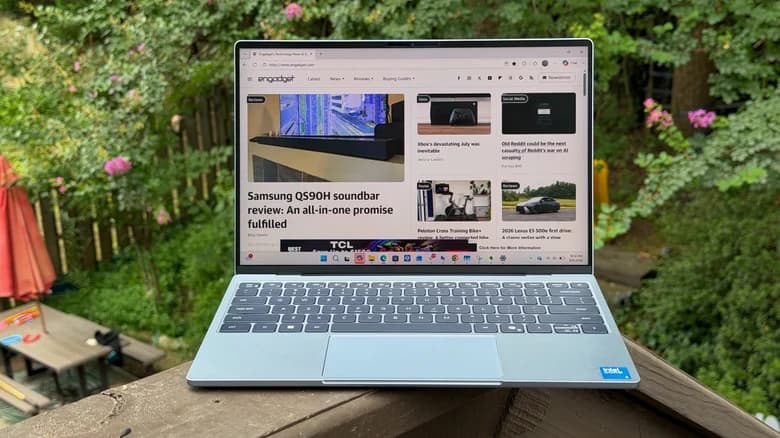
Dell XPS 13 (2026) Review: A MacBook Neo Alternative That Needs More RAM
The Dell XPS 13 (2026) continues Dell’s push toward premium, compact Windows laptops, combining a sleek design with modern performance and impressive portability. For users who love the simplicity and portability of Apple’s latest entry-level MacBook lineup but prefer Windows, the XPS 13 is an interesting alternative.
However, there is one major weakness that holds the base configuration back: RAM.
With a beautiful display, a premium chassis, strong battery life, and a compact form factor, the Dell XPS 13 has many of the ingredients needed to compete with Apple’s lightweight laptops. But depending on the configuration, its memory capacity can become a serious limitation for developers, creators, and power users.
Premium Design That Still Stands Out
Dell has maintained the minimalist philosophy that made the XPS family popular. The 2026 XPS 13 features a slim, lightweight body designed for people who frequently work on the move.
Its compact footprint makes it easy to carry in a backpack, while the premium construction gives it a more expensive feel than many mainstream Windows laptops.
The minimalist approach also makes the XPS 13 feel less like a traditional business laptop and more like a modern consumer device. That puts it directly in competition with Apple's MacBook lineup.
Display: One of the XPS 13's Biggest Strengths
The display is one of the areas where the XPS 13 continues to impress.
Dell has traditionally offered excellent displays in the XPS series, and the 2026 model continues that philosophy with a sharp, vibrant panel that works well for everyday productivity, entertainment, and creative tasks.
The compact 13-inch form factor provides a good balance between portability and usable screen space.
For people who spend hours writing, browsing, coding, or working with documents, the high-quality display can make a noticeable difference.
The thin bezels also help the laptop maintain its modern appearance without making the overall chassis significantly larger.
Performance: Fast Enough for Everyday Work
The Dell XPS 13 (2026) is designed primarily as a portable productivity machine rather than a gaming laptop or workstation.
For everyday tasks such as:
Web browsing
Microsoft Office
Video calls
Programming
Photo editing
Streaming
Multitasking
General productivity
the XPS 13 provides more than enough performance.
Modern processors also make the laptop capable of handling heavier workloads than previous generations.
For developers, the machine can comfortably handle tools such as VS Code, browser-based development environments, Git, terminal applications, and local development servers.
However, performance isn't the biggest concern with the base model.
Memory is.
The RAM Problem
This is where the Dell XPS 13 (2026) becomes harder to recommend.
A modern laptop with limited RAM can quickly become frustrating when you start multitasking.
Today's workflows are significantly more demanding than they were a few years ago. A typical developer might have VS Code, Chrome with multiple tabs, Docker, a database, Slack, Git clients, and several development servers running simultaneously.
Creative professionals can face similar problems when working with large images, video editing software, or multiple applications.
Even regular users can run into memory limitations because modern browsers are surprisingly RAM-hungry.
That's why the base RAM configuration feels out of place on a premium laptop like the XPS 13.
Why 16GB Should Be the Minimum
For a laptop in this price category, 16GB of RAM should be considered the practical starting point.
8GB can still work for basic browsing, documents, streaming, and light productivity. But if you plan to keep the laptop for several years, 16GB provides considerably more breathing room.
And if you're a developer, designer, engineer, or content creator, going beyond 16GB can make even more sense.
The important thing is that you shouldn't choose the cheapest XPS 13 configuration simply because the upfront price looks attractive.
Paying more for additional RAM can dramatically improve the laptop's long-term usability.
Battery Life
Battery life is another important factor in a thin-and-light laptop.
The XPS 13 is designed for mobility, meaning users should be able to work away from an outlet for a significant portion of the day.
Actual battery life will vary depending on screen configuration, workload, brightness, applications, and power settings. Lightweight tasks such as writing and browsing will naturally consume less power than compiling code, editing video, or running virtual machines.
For students, professionals, and remote workers, the XPS 13's combination of portability and battery efficiency makes it a compelling travel laptop.
Keyboard and Trackpad
Dell's premium XPS design has always emphasized the keyboard and trackpad experience.
The compact chassis doesn't leave much room, but Dell has managed to create a layout that feels suitable for long typing sessions.
The trackpad is equally important because Windows laptops increasingly rely on precision touchpads and gesture controls.
For productivity-focused users, these seemingly small details matter. A laptop can have excellent specifications, but if the keyboard and trackpad are uncomfortable, using it every day becomes frustrating.
Ports and Connectivity
The thin design inevitably affects port selection.
Modern premium ultraportables increasingly rely on USB-C and wireless connectivity rather than providing a large collection of traditional ports.
This keeps the laptop slim but can create inconvenience for users who regularly connect HDMI displays, USB-A accessories, SD cards, Ethernet adapters, or other peripherals.
If your desk setup includes multiple external devices, budgeting for a USB-C hub or docking station may be necessary.
Windows vs. MacBook Neo
The biggest question surrounding the XPS 13 is whether it makes sense as an alternative to Apple's MacBook Neo.
The answer depends heavily on what you want from your laptop.
The MacBook Neo offers Apple's ecosystem, macOS, excellent hardware-software integration, and the simplicity associated with Apple's laptop experience.
The XPS 13, meanwhile, offers the flexibility of Windows.
That matters for developers and professionals who rely on Windows-specific applications, enterprise software, certain development tools, or PC gaming.
The XPS 13 also gives users considerably more flexibility when it comes to the Windows ecosystem and hardware choices.
Dell XPS 13 vs. MacBook Neo
FeatureDell XPS 13 (2026)MacBook NeoOperating SystemWindowsmacOSDesignPremium, compactMinimalist, compactPortabilityExcellentExcellentDisplayHigh-qualityHigh-qualityPerformanceStrong for productivityStrong for everyday useRAMConfiguration-dependentConfiguration-dependentSoftwareWindows ecosystemApple ecosystemGamingBetter Windows compatibilityLimitedDeveloper flexibilityExcellentExcellentUpgrade flexibilityLimited depending on configurationLimitedBest forWindows users & professionalsApple ecosystem users
The choice ultimately comes down to ecosystem and workflow rather than specifications alone.
Who Should Buy the Dell XPS 13?
The Dell XPS 13 (2026) is a strong option for:
Students:
Its compact size and portability make it easy to carry between classes, libraries, and home.
Developers:
The combination of Windows, a strong processor, and a premium display makes it suitable for software development.
Business professionals:
Its understated design and portability make it a good machine for office work and travel.
Remote workers:
A compact laptop with strong battery life can be ideal for working from different locations.
Windows users:
If you prefer Windows but want something with the premium feel of a MacBook, the XPS 13 deserves attention.
Who Should Avoid It?
The XPS 13 may not be the best choice for users who need:
Serious gaming performance
Extensive port selection
Upgradeable memory
A large display
Dedicated graphics
Heavy workstation-class workloads
If you regularly edit high-resolution video, work with large 3D projects, or run several virtual machines, a larger and more powerful laptop would make more sense.
Final Verdict
The Dell XPS 13 (2026) is one of the more attractive Windows alternatives to Apple's compact MacBook experience.
Its premium design, excellent display, portability, and capable performance make it an appealing everyday laptop. For Windows users who want something sleek and refined rather than a traditional bulky notebook, the XPS 13 checks many of the right boxes.
But the RAM configuration is the elephant in the room.
A premium laptop shouldn't feel constrained by memory after only a few years of normal use. If you're considering the XPS 13, choosing 16GB of RAM or more is the smarter long-term investment.
Ultimately, the XPS 13 is a compelling MacBook Neo alternative — just don't compromise too much on RAM to get the lowest-priced configuration.
Rating: 8/10
Pros
Premium and lightweight design
Excellent display
Strong everyday performance
Great portability
Windows flexibility
Good option for developers and professionals
Cons
Base RAM configuration can be limiting
Limited physical ports
Higher configurations can become expensive
Not designed for serious gaming or workstation workloads
Bottom line: The Dell XPS 13 (2026) gets most things right. With a better RAM configuration, it could be one of the best compact Windows laptops for users looking for a premium alternative to Apple's entry-level MacBook experience.